Best Embroidery Digitizing File Formats: 2026 Guide
You’ve spent hours perfecting your brand’s logo, yet when you send it over for a custom polo or hat, you’re met with talk of “digitizing fees” and “stitch counts” that feel like a foreign language. It’s frustrating to realize that the high-resolution image on your screen doesn’t automatically translate into a beautiful, tactile piece of embroidery. Most clients understandably assume a crisp JPEG is the best file format for embroidery digitizing, but there’s a significant difference between a picture made of pixels and a design built for a needle and thread.
We’re here to bridge that gap and give you total confidence in your custom projects. In this 2026 guide, you’ll discover exactly which files to provide your embroiderer to ensure your logo looks sharp, professional, and sophisticated. We will demystify the difference between vector and raster files, explain why machine-specific formats like .DST and .PES matter, and show you how the right starting point prevents the dreaded “blurry” thread look. By the end, you’ll have a clear roadmap to transform your digital vision into a physical masterpiece.
Key Takeaways
- Learn why professional vector files like .AI and .EPS are the essential starting point for any custom project to ensure sharp, clean edges on your embroidered apparel.
- Understand that while many search for the best file format for embroidery digitizing, the true secret lies in the quality of the initial artwork path rather than just the final machine file.
- Discover the role of .DST files as the universal language for commercial embroidery machines and why they are vital for creating high-quality hats and polos.
- Identify the technical factors, such as stitch density and underlay, that prevent your logo from looking thin or blurry once it is rendered in thread.
- Realize why boutique, manual digitizing outshines automated software by providing the meticulous care needed for complex 3D puff designs and custom patches.
The Difference Between Image Files and Stitch Files
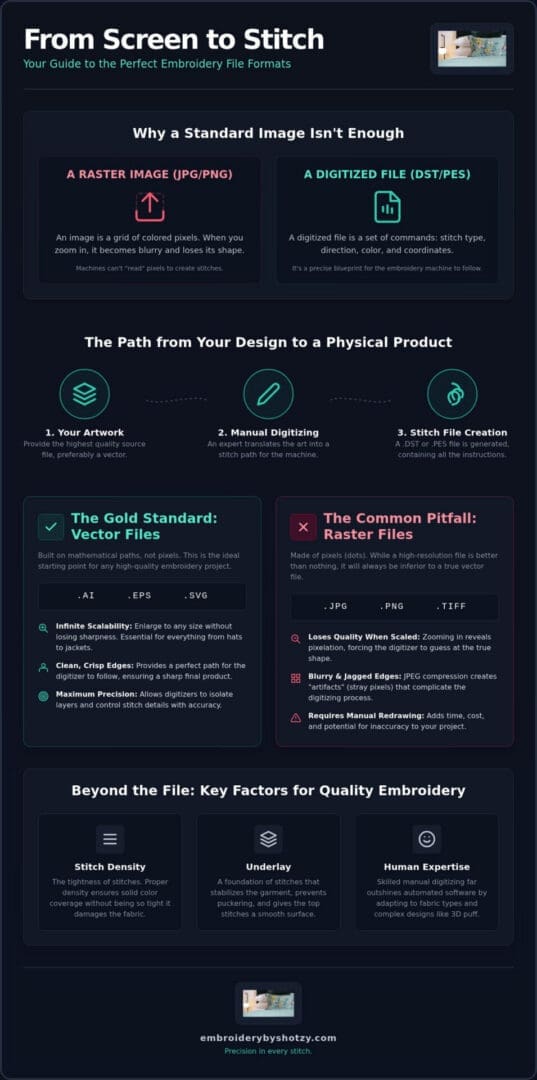
Imagine handing a photograph to a seamstress and expecting her to replicate it with a single needle and thread without any instructions. That is essentially what happens when you send a standard JPEG or PNG to an embroiderer. A computerized embroidery machine is a sophisticated piece of hardware, but it cannot “see” an image the way we do. It doesn’t recognize shapes or shadows; it only understands movement and commands. To bridge the gap between your digital art and a physical garment, we use a process called digitizing.
Professional digitizing is the art of translating a flat graphic into a three-dimensional texture. It involves deciding where every single stitch begins and ends. A skilled digitizer chooses the path of the thread, the angle of the stitches, and how tightly those threads are packed together. If this translation is done poorly, the machine might struggle. This often leads to frequent thread breaks, “bird-nesting” on the underside of the fabric, or even damage to the garment itself. The right file format acts as a clear set of instructions that keeps the machine running smoothly and your design looking sharp.
What is a Digitized File?
A digitized file is much more than a simple change in file extension. You can’t just rename a “logo.png” to a “logo.dst” and expect it to work. Instead, a true digitized file contains specific coordinates and commands for the machine: “trim the thread here,” “change color to navy blue,” or “jump to these specific coordinates.” This requires a human expert to interpret your artwork. While some software offers “auto-digitizing” features, they often fail to account for how thread pulls on different fabrics. A human digitizer understands the “push and pull” of the thread, ensuring the final product doesn’t pucker or distort.
Why Format Matters for Your Brand
When you’re looking for the best file format for embroidery digitizing, you’re actually looking for a way to protect your brand’s visual identity. A logo that looks crisp on a flat business card might look “squashed” or “thin” on a structured hat if the file isn’t optimized for that specific surface. High-quality digitizing ensures that your custom patches maintain the same level of detail as the logo on your custom polos. It provides the consistency that marks a professional organization. By providing the correct source files from the start, you give your digitizer the foundation needed to create a masterpiece that represents your brand with excellence and precision.
The Best Source Files: Why Vectors Rule the Embroidery World
While the machine eventually needs a stitch file to operate, the quality of that final product depends entirely on the source artwork you provide. Think of your source file as the blueprint for a house. If the blueprint is blurry or lacks detail, the building will be crooked. For most professionals, the best file format for embroidery digitizing starts with a vector file. Unlike standard images, vector files are built on mathematical paths rather than a grid of colored pixels. This distinction is crucial when navigating various embroidery file formats because it determines how much manual “fixing” a digitizer must do before the first stitch is even placed.
Vector Formats (.AI, .EPS, .SVG)
Vector files are the gold standard for a reason. Because they use geometric paths, they offer infinite scalability. You can enlarge a tiny logo to fit the back of a jacket without a single line losing its crispness. This clarity allows a digitizer to see exactly where a satin stitch should start and stop. Using vector files isn’t just about quality; it’s about precision. When a digitizer works with an .EPS file, they can isolate specific layers of your design. This means they can precisely set the underlay stitches for a structured hat or adjust the density for a soft polo without guesswork. It’s the most reliable way to ensure your brand’s transition to thread is seamless. Providing these files often reduces the time spent on manual redraws, which helps get your brand on custom polos or hats much faster.
Raster Formats (.PNG, .JPG, .TIFF)
Many clients believe a high-resolution JPEG is just as good as a vector, but this is a common myth. Even at 300 DPI, a raster image is still just a collection of dots. When we zoom in to map out thread paths, those dots become blurry squares. JPEGs are particularly troublesome because of “compression artifacts.” These are the tiny speckles of color that appear around the edges of a logo, making it difficult for the digitizer to find the “true” edge of your design.
Transparent PNGs are a slightly better alternative because they lack the flat white background that can hide design details, but they still lack the mathematical precision of a vector. If a high-quality photo is the only thing you have, don’t worry. Our team handles these scenarios by manually redrawing the design to ensure it meets our standards for excellence. While this takes a bit more time than working with an .AI file, it’s the only way to guarantee that your personalized baby blankets or custom patches look like a work of art rather than a digital mistake.
Common Machine Formats: From .DST to .PES
Once your artwork has been meticulously translated by a digitizer, it must be exported into a language that a Ultimate Guide to Embroidery File Formats would describe as a “stitch file.” This is the final instruction manual for the machine. While we’ve established that a vector is the best file format for embroidery digitizing from a design perspective, the machine itself cannot read an .AI or .EPS file. It requires a specific set of coordinates that tell the needle exactly where to drop. For most customers, you won’t need to generate these yourself; a professional service handles this conversion to ensure your logo looks perfect on a structured hat or a delicate polo.
The two most common formats you’ll encounter are .DST and .PES. A .DST file is the universal standard for commercial embroidery machines. It’s robust and reliable, making it the preferred choice for bulk orders of custom patches or embroidered bags. However, .DST files are “stitch-only” formats, meaning they don’t actually store color information. The machine simply sees a “stop” command, and the operator manually assigns the thread color. On the other hand, .PES is a proprietary format used primarily by Brother machines. It’s common in boutique settings and home-based studios because it does include color data, allowing the machine to suggest specific thread shades.
Commercial vs. Home Embroidery Formats
In a professional Houston-based shop, efficiency and precision are paramount. We typically rely on .DST files for our commercial equipment because of their universal compatibility. While .DST is the workhorse of the industry, other brands have their own “languages.” For instance, Bernina machines often use .EXP, while Husqvarna machines look for .HUS files. These proprietary formats are designed to work seamlessly with specific hardware. As a client, you don’t need to own the software for these formats. Your primary job is providing the high-quality source art; we take care of the technical output to ensure the stitches are dense, secure, and beautiful.
Converting Between Formats
It’s a common mistake to think you can simply “save as” to change a .PES to a .DST. Simple file conversion without re-digitizing often leads to errors. Stitches might shift, or the density might become inconsistent, resulting in a design that looks puckered or thin. This is why we emphasize the importance of the “native” digitizing file. This master file, created in professional software, allows us to make future edits or resize your logo for different items, like moving from a large bag design to a small monogram on a baby blanket. We keep these digitized files on hand for your future re-orders, ensuring that every batch of custom polos you receive in the future matches the high standard of your first order.
Technical Factors That Affect Your Digitized File Quality
While you might provide the best file format for embroidery digitizing, the true quality of the finished product lies in the internal architecture of the stitch data. A file might have the correct .DST extension, but if the stitch density is poorly calibrated, the result will be either a “bulletproof” design that’s too stiff or a logo so thin the fabric peaks through. We carefully adjust the density to match the specific garment, ensuring that a heavy canvas bag and a light, breathable polo both receive the perfect amount of thread coverage.
Underlay stitches serve as the invisible foundation of your design. Much like a house needs a stable slab, a high-quality embroidery project needs a base layer of thread to stabilize the fabric and loft the top stitches. Without proper underlay, your logo can sink into the weave, losing its crispness and professional edge. We also account for “pull compensation” during the digitizing process. Thread naturally cinches the fabric as it’s sewn; a master digitizer over-compensates for this in the digital file so that circles actually look like circles once they are rendered in thread.
Pathing is another critical technical factor. This is the sequence in which the machine executes the design. Efficient pathing minimizes “jumps” and trims, which prevents the back of the garment from becoming a messy web of loose threads. It also ensures the design builds correctly from the center out, which significantly reduces fabric shifting during the production of custom patches or embroidered hats.
Resizing and Scaling
You can’t simply “stretch” an embroidery file like you would a digital photo. If you enlarge a design by more than 10-20%, the software often just spreads the existing stitches further apart, creating unsightly gaps. For significant changes, such as moving a logo from a small hat to a large jacket back, a complete re-digitize is usually necessary. This ensures the stitch count and pathing remain optimal for the new scale and maintain the integrity of your brand’s image.
Color Mapping and Thread Selection
Translating digital RGB values into physical thread is a delicate process. We map your brand colors to industry-leading threads like Madeira or Robinson-Anton to ensure a sophisticated match. For those seeking a bold, tactile look, we also specialize in 3D puff embroidery. This requires specific file settings to accommodate the thick foam used to raise the design, a service you can explore through our professional digitizing expertise. Managing these technical nuances is what separates a generic service from a boutique masterpiece.
Professional Logo Digitizing Services in Houston: The Shotzy Approach
In an era of instant automation, it’s tempting to believe that software can replace the human eye. Many online services offer “auto-digitizing” that promises a finished stitch file in seconds, but these algorithmic shortcuts often fail the test of quality. They don’t understand how thread pulls on a structured hat or how a custom polo’s knit can swallow thin lines. At Embroidery By Shotzy, we reject the one-size-fits-all digital approach. We treat every logo as a unique narrative that deserves a meticulous, hand-crafted translation.
While we’ve established why vectors are the best file format for embroidery digitizing, the true magic happens when our Houston-based experts begin the manual mapping process. We don’t just convert your file; we interpret it. This means making deliberate choices about stitch direction and density that a computer program simply can’t replicate. Our one-time digitizing fee isn’t just a technical requirement; it’s an investment in the long-term excellence of your brand. Once your file is perfected and archived, every subsequent order of custom patches or embroidered bags will maintain the same high standard of precision.
Our Boutique Creative Process
Our journey together begins with a thorough review of your provided artwork. If you don’t have a vector file, we’ll work with you to ensure your raster image is clear enough for a manual redraw. We then move into the digitizing phase, where we carefully plan the pathing and underlay for your specific garment. Before any production begins, we perform a test stitch-out. This allows us to see how the thread interacts with the fabric in the physical world, ensuring that your personalized baby blankets or custom patches are flawless. Being a local Houston partner means we’re personally invested in your project’s success; we’re a creative collaborator who values the personal significance of your work.
Getting Started with Your Project
Preparing for your first order is simple. To receive an accurate quote, please provide your logo in a high-resolution format, preferably an .AI or .EPS vector. Our team typically completes the digitizing process within a few business days, followed by a steady production timeline that keeps your project on track. Whether you’re looking to outfit a corporate team in Houston or create a unique gift, we’re here to guide you through every technical decision. Bring your vision to life with our custom Houston embroidery services and experience the difference that boutique craftsmanship makes for your brand.
Bringing Your Vision to Life with Thread and Needle
Choosing the best file format for embroidery digitizing is the first step in ensuring your brand’s story is told with clarity and excellence. By prioritizing high-quality vector source files like .AI or .EPS, you provide the necessary blueprint for a flawless transition from screen to fabric. We’ve seen how the right technical approach to stitch density and pathing prevents common pitfalls like blurry edges or puckered fabric, allowing your logo to stand out on custom polos and hats with professional authority.
Our boutique studio has been expertly digitizing logos since 2014, blending technical precision with the creative warmth of a local Houston artisan. We specialize in high-detail custom patches and complex designs that require a meticulous, hand-crafted touch rather than an automated shortcut. When you’re ready to transform your digital concepts into physical reality, we’re here to guide you through every step of the creative process. Start your custom embroidery project in Houston today and let us help you create a lasting impression through quality craftsmanship.
Frequently Asked Questions
What is the absolute best file format to send my embroiderer?
Vector files such as .AI, .EPS, or .SVG are the absolute best choice to send to your embroiderer. These formats use mathematical paths instead of pixels. This allows for infinite scaling without any loss of detail, which is essential for achieving crisp, professional results on structured hats and polos. Most experts agree that a clean vector is the best file format for embroidery digitizing because it provides the most reliable foundation for our artisans.
Can you digitize a logo from a photo I took on my phone?
We can certainly digitize a logo from a photo, but it requires an extra step of artisan craftsmanship. Since a phone photo is a raster image made of pixels, our team must manually redraw the design to create clean, sharp paths. This manual interpretation ensures your final embroidery doesn’t look blurry or distorted. It’s how we transform a simple digital snapshot into a sophisticated masterpiece for your custom patches or personalized baby blankets.
Why do I have to pay a digitizing fee if I already have the logo?
The digitizing fee is an investment in the precision and quality of your finished garment. Even if you have a beautiful logo, an embroidery machine cannot ‘read’ a standard image file. The fee covers the skilled labor of an artisan who translates your art into specific needle movements, stitch densities, and thread paths. This one-time setup ensures your brand looks impeccable every time you order new custom polos, hats, or bags from our Houston studio.
Is a .PDF file considered a vector format for embroidery?
A .PDF can be a vector format, but it depends entirely on how the file was created. If your designer saved the .PDF directly from a program like Illustrator, it will likely contain the sharp paths we need. However, if it’s a scan or a saved image, it remains a raster file. We always examine your files to ensure we have the best file format for embroidery digitizing to maintain your brand’s excellence.
What happens if I want to change the size of my logo later?
Resizing a logo involves more than just dragging a corner in a software program. Because stitch counts are tied to specific dimensions, a significant change in size usually requires a complete re-digitize to maintain quality. If you want to move a logo from a small hat to a large jacket back, we must recalibrate the density and underlay. We keep your master files archived to make these transitions as smooth and professional as possible.
Do I own the digitized file after I pay the setup fee?
We maintain your digitized file in our secure archives to ensure consistency for all your future orders. While the one-time fee covers the expert service of creating the stitch data, the proprietary file remains part of our boutique production environment. This allows us to quickly fulfill repeat orders for custom scrubs or towels without you needing to manage technical software. It guarantees that your brand’s visual legacy remains identical across every project we complete together.
What is the difference between a .DST file and a .PES file?
The difference between .DST and .PES is primarily about machine compatibility. A .DST file is the universal commercial standard used by professional shops for high-volume orders of custom patches and bags. It is a robust format that focuses on stitch coordinates. Conversely, .PES is a proprietary format used by Brother machines that often includes color data. We use the format that best suits our commercial equipment to ensure every stitch is placed with meticulous accuracy.
How long does the digitizing process usually take?
Our artisan digitizing process typically takes between two and four business days in our Houston studio. This time allows our team to carefully review your artwork, map out the most efficient thread paths, and conduct a test stitch-out. We prioritize this methodical approach to ensure the final product meets our standards for excellence. Once the digitizing is perfected, we move straight into the production phase to bring your custom aprons or monogrammed towels to life.